<?xml version="1.0" encoding="utf-8"?><feed xmlns="http://www.w3.org/2005/Atom" ><generator uri="https://jekyllrb.com/" version="4.4.1">Jekyll</generator><link href="https://thomas-witt.com/feed.xml" rel="self" type="application/atom+xml" /><link href="https://thomas-witt.com/" rel="alternate" type="text/html" /><updated>2026-03-30T19:11:31+08:00</updated><id>https://thomas-witt.com/feed.xml</id><title type="html">Thomas Witt: Tech Entrepreneur &amp;amp; Angel Investor</title><subtitle>Tech entrepreneur, zero-to-one SaaS founder, and angel investor. Co-founder of Expedite Ventures, investing in deep-tech startups.</subtitle><author><name>Thomas Witt</name></author><entry><title type="html">I Read the Anthropic Legal Prompts That Crashed $285B in Stocks</title><link href="https://thomas-witt.com/blog/285-billion-wiped-out-because-of-a-text-file/" rel="alternate" type="text/html" title="I Read the Anthropic Legal Prompts That Crashed $285B in Stocks" /><published>2026-02-05T00:00:00+08:00</published><updated>2026-02-05T18:51:56+08:00</updated><id>https://thomas-witt.com/blog/285-billion-wiped-out-because-of-a-text-file</id><content type="html" xml:base="https://thomas-witt.com/blog/285-billion-wiped-out-because-of-a-text-file/"><![CDATA[<p>On February 3, 2026, tech stocks went into free fall. Thomson Reuters dropped
15.83% — its biggest single-day decline on record. LegalZoom fell 19.68%. The
Goldman Sachs US software basket lost 6%. Total damage: <strong>$285 billion in market
cap</strong>, gone in a single session.</p>

<p>Bloomberg ran the headline: <a href="https://www.bloomberg.com/news/articles/2026-02-03/legal-software-stocks-plunge-as-anthropic-releases-new-ai-tool">“Anthropic AI Tool Sparks Selloff From Software
to Broader
Market.”</a></p>

<p>So I went and read what Anthropic actually shipped.</p>

<h2 id="what-anthropic-actually-released">What Anthropic Actually Released</h2>

<p>On January 30, Anthropic open-sourced
<a href="https://github.com/anthropics/knowledge-work-plugins">eleven plugins</a> for
Claude Cowork, their agentic desktop app. One of those plugins was for
<a href="https://github.com/anthropics/knowledge-work-plugins/tree/main/legal">legal work</a> —
six subdirectories of plain text files: <code class="language-plaintext highlighter-rouge">contract-review</code>, <code class="language-plaintext highlighter-rouge">nda-triage</code>,
<code class="language-plaintext highlighter-rouge">compliance</code>, <code class="language-plaintext highlighter-rouge">legal-risk-assessment</code>, <code class="language-plaintext highlighter-rouge">meeting-briefing</code>, and
<code class="language-plaintext highlighter-rouge">canned-responses</code>.</p>

<p>No new model. No API. No product launch. A GitHub repo with ~2,500 lines of
structured prompt instructions. The kind of thing thousands of developers write
every day when building on top of LLMs.</p>

<p>Here’s the core of the
<a href="https://github.com/anthropics/knowledge-work-plugins/blob/main/legal/skills/contract-review/SKILL.md">contract review methodology</a>,
quoted directly from the repo:</p>

<blockquote>
  <ol>
    <li><strong>Identify the contract type</strong>: SaaS agreement, professional services, license, partnership, procurement, etc.</li>
    <li><strong>Determine the user’s side</strong>: Vendor, customer, licensor, licensee, partner.</li>
    <li><strong>Read the entire contract</strong> before flagging issues. Clauses interact with each other.</li>
    <li><strong>Analyze each material clause</strong> against the playbook position.</li>
    <li><strong>Consider the contract holistically</strong>: Are the overall risk allocation and commercial terms balanced?</li>
  </ol>
</blockquote>

<p>That’s the review process. The entire methodology. Identify, determine sides,
read, analyze, consider holistically. This is what a law school student probably
learns on day one.</p>

<h2 id="first-year-law-school-material">First-Year Law School Material</h2>

<p>The NDA triage skill is a 10-point checklist: agreement structure, definition
scope, obligations, standard carveouts, permitted disclosures, term,
return/destruction, remedies, problematic provisions, governing law. Every
in-house legal team has this document pinned somewhere. The green/yellow/red
classification system is a standard risk matrix — the same framework taught in
corporate legal training.</p>

<p>Don’t get me wrong: The prompts are well-crafted. But: They’re not magic.
They’re structured instructions for tasks that legal professionals have been
doing for decades. And they’re <strong>open source</strong> — anyone can read them, copy
them, modify them. You can run them in OpenAI. Or an Open Source Model like
DeepSeek.</p>

<p>There is no competitive advantage here that couldn’t be replicated by a
competent developer in an afternoon.</p>

<h2 id="the-information-asymmetry-is-the-story">The Information Asymmetry Is the Story</h2>

<p>The repo is public. Anyone could have read it in 10 minutes. The market priced
in fear of something that’s fully auditable on GitHub. That gap between
perception and reality is the actual story.</p>

<p>So $285 bn lost — not because of a product launch, but because of a markdown
file in a GitHub repo. Investors didn’t click through. They didn’t read the
prompts. They didn’t ask a single engineer what a “skill plugin” actually is.
They saw “Anthropic” and “legal” in the same sentence and hit sell.</p>

<p>This isn’t an AI disruption story. This is a <strong>market literacy story</strong>. The
selloff tells us nothing about AI’s impact on the legal profession and everything
about how poorly the market understands what AI companies actually ship.</p>

<h2 id="what-this-actually-tells-builders">What This Actually Tells Builders</h2>

<p>Anthropic published these prompts freely because the prompts aren’t the product.</p>

<p>The “moat” for vertical AI isn’t prompt engineering — it’s execution, trust,
integration, compliance, and liability acceptance. Anthropic just demonstrated
that by giving the prompts away. What does that tell you about every “AI
wrapper” startup whose entire value prop is a system prompt?</p>

<h2 id="the-real-question">The Real Question</h2>

<p>AI will reshape law firms, consultancies, and half the NASDAQ. That’s not
controversial. The “software eating software” thesis has been in every VC deck
since 2023. Claude Code, Cursor, Codex — they all exist. Nobody disputes the
direction.</p>

<p>So why did a GitHub commit containing first-year law school content trigger a
$285 billion repricing? Either the market hadn’t priced in something that’s been
“obvious to everyone” — meaning it wasn’t actually obvious to investment
professionals — or they overreacted to a headline without reading the repo.
Both are equally frightening.</p>

<p>And here’s the kicker: this repo is <em>public</em>. If the people managing your money
can’t do due diligence on something freely auditable on GitHub, what are they
diligencing behind closed doors?</p>

<p>If your investment thesis can be wrecked by a README file, maybe the thesis was
never there to begin with.</p>]]></content><author><name>Thomas Witt</name></author><category term="AI" /><summary type="html"><![CDATA[On February 3, 2026, tech stocks went into free fall. Thomson Reuters dropped 15.83% — its biggest single-day decline on record. LegalZoom fell 19.68%. The Goldman Sachs US software basket lost 6%. Total damage: $285 billion in market cap, gone in a single session.]]></summary><media:thumbnail xmlns:media="http://search.yahoo.com/mrss/" url="https://thomas-witt.com/assets/images/posts/2026-02-05-text-file.jpeg" /><media:content medium="image" url="https://thomas-witt.com/assets/images/posts/2026-02-05-text-file.jpeg" xmlns:media="http://search.yahoo.com/mrss/" /></entry><entry><title type="html">From a Stalled Map to an Async AWS SDK: Why I Built aws-sdk-http-async</title><link href="https://thomas-witt.com/blog/aws-sdk-http-async/" rel="alternate" type="text/html" title="From a Stalled Map to an Async AWS SDK: Why I Built aws-sdk-http-async" /><published>2025-01-19T00:00:00+08:00</published><updated>2026-01-20T19:35:32+08:00</updated><id>https://thomas-witt.com/blog/aws-sdk-http-async</id><content type="html" xml:base="https://thomas-witt.com/blog/aws-sdk-http-async/"><![CDATA[<p>I maintain a side project called <a href="https://airfield.directory">Airfield
Directory</a>, a Rails app backed by
<a href="https://docs.aws.amazon.com/amazondynamodb/latest/developerguide/">DynamoDB</a>
for general aviation pilots.</p>

<p>Because DynamoDB access is essentially all network I/O over HTTPS, it is a good
playground to tinker with Ruby fibers before bringing the same approach into
other production systems.</p>

<p>Airfield Directory runs on Falcon because I want fiber-based concurrency without
the memory overhead of thread-per-request. It should feel fast and smooth under
load.</p>

<p>Then the <a href="https://airfield.directory/search">dynamic map</a> happened.</p>

<p>The map view fans out a lot of DynamoDB queries across H3 hexagonal grid cells
(a system invented by Uber). Under Falcon, I expected those requests to overlap
in fibers. Instead, the reactor stalled and the app behaved like it was
single-threaded again: latency spikes, janky scrolling, that “it’s fast until it
isn’t” feel.</p>

<p>My first instinct was to do what I do elsewhere (e.g. ruby_llm): wrap the hot
path in <code class="language-plaintext highlighter-rouge">Async { ... }</code> and trust the scheduler. It didn’t help. The AWS SDK was
still blocking the reactor.</p>

<h2 id="trying-to-explain-why-the-aws-sdk-for-ruby-fights-falcon">Trying to explain why the AWS SDK for Ruby fights Falcon</h2>

<p>The AWS SDK’s default HTTP transport uses Net::HTTP wrapped in a connection
pool. Contrary to what you might expect, Net::HTTP itself <em>is</em> fiber-friendly in
Ruby 3.0+—the fiber scheduler hooks into blocking I/O and yields to other fibers
automatically.</p>

<p>But in practice, those implicit hooks don’t yield reliably, so the single
reactor thread gets blocked often enough that all fibers serialize.</p>

<p>What I actually saw in production:</p>

<div class="language-ruby highlighter-rouge"><div class="highlight"><pre class="highlight"><code><span class="n">barrier</span> <span class="o">=</span> <span class="no">Async</span><span class="o">::</span><span class="no">Barrier</span><span class="p">.</span><span class="nf">new</span><span class="p">(</span><span class="ss">parent: </span><span class="n">parent_task</span><span class="p">)</span>
<span class="n">batch_cells</span><span class="p">.</span><span class="nf">each</span> <span class="p">{</span> <span class="o">|</span><span class="nb">id</span><span class="o">|</span> <span class="n">barrier</span><span class="p">.</span><span class="nf">async</span> <span class="p">{</span> <span class="n">dynamodb</span><span class="p">.</span><span class="nf">query</span><span class="p">(</span><span class="o">...</span><span class="p">)</span> <span class="p">}</span> <span class="p">}</span>
<span class="n">barrier</span><span class="p">.</span><span class="nf">wait</span>
</code></pre></div></div>

<p>-&gt; Observed: serialized request time</p>

<div class="language-ruby highlighter-rouge"><div class="highlight"><pre class="highlight"><code><span class="n">threads</span> <span class="o">=</span> <span class="n">batch_cells</span><span class="p">.</span><span class="nf">map</span> <span class="p">{</span> <span class="o">|</span><span class="nb">id</span><span class="o">|</span> <span class="no">Thread</span><span class="p">.</span><span class="nf">new</span> <span class="p">{</span> <span class="n">dynamodb</span><span class="p">.</span><span class="nf">query</span><span class="p">(</span><span class="o">...</span><span class="p">)</span> <span class="p">}</span> <span class="p">}</span>
<span class="n">threads</span><span class="p">.</span><span class="nf">each</span><span class="p">(</span><span class="o">&amp;</span><span class="ss">:join</span><span class="p">)</span>
</code></pre></div></div>

<p>-&gt; Observed: 1× single request time (concurrent)</p>

<p>So my current observation/explanation is:</p>

<ul>
  <li>The SDK’s Net::HTTP transport is synchronous end‑to‑end and relies on implicit scheduler hooks in Net::HTTP/OpenSSL/DNS.</li>
  <li>In our workload, that path blocked the reactor often enough that the Async::Barrier output serialized.</li>
  <li>Threads still overlapped because each call ran in its own OS thread.
Swapping the transport to async‑http fixed it because async‑http is fiber‑native end‑to‑end (pool + I/O), so the reactor can actually interleave requests.</li>
</ul>

<p>I can’t tell you in detail whether it’s gaps in hook coverage, OpenSSL handshakes, DNS resolutions, whatever … In the end, async-http seems to me to be by far the best solution in the whole Async ecosystem. Of course, there might be other side effects I have overlooked, but in the end was/is my real-life observation reproducable.</p>

<p>I eventually fell back to threads just to keep the UI responsive. It worked, but
it felt wrong.</p>

<p>I dug through the SDK internals and landed on the same conclusion captured in
this issue: <a href="https://github.com/aws/aws-sdk-ruby/issues/2621">https://github.com/aws/aws-sdk-ruby/issues/2621</a> and an
<a href="https://github.com/saluzafa/async-aws-ruby">abandoned experimental repo</a>.</p>

<p>So, in a nutshell:</p>

<ul>
  <li>Threads overlapped because each call ran in its own OS thread.</li>
  <li>Fibers with <code class="language-plaintext highlighter-rouge">Async::Barrier</code> serialized under Falcon.</li>
  <li>Swapping the transport to <code class="language-plaintext highlighter-rouge">async-http</code> fixed it—because <code class="language-plaintext highlighter-rouge">async-http</code> is fiber-native end-to-end (pool + I/O), most likely because the reactor can actually interleave requests.</li>
</ul>

<h2 id="the-solution-aws-sdk-http-async">The solution: aws-sdk-http-async</h2>

<p>I built a new HTTP handler as a gem plugin for aws-sdk-core using async-http called
<a href="https://github.com/thomaswitt/aws-sdk-http-async">aws-sdk-http-async</a>. It
aims to preserve the SDK’s semantics (retries, error handling, telemetry,
content-length validation), but make the transport fiber-friendly under Falcon.</p>

<p>Key goals:</p>

<ul>
  <li>Async transport when a reactor exists (Falcon).</li>
  <li>Automatic fallback to Net::HTTP when no reactor exists (rake/console/tests).</li>
  <li>No patches required to make CLI tasks work.</li>
  <li>Safe defaults, explicit config, and clear failure modes for event streams.</li>
</ul>

<h2 id="usage-zero-config">Usage (zero-config)</h2>

<p>Add it to your Gemfile:</p>

<div class="language-ruby highlighter-rouge"><div class="highlight"><pre class="highlight"><code><span class="n">gem</span> <span class="s1">'aws-sdk-http-async'</span>
</code></pre></div></div>

<p>More information in the <a href="https://github.com/thomaswitt/aws-sdk-http-async">repo on
Github</a></p>]]></content><author><name>Thomas Witt</name></author><category term="coding" /><summary type="html"><![CDATA[I maintain a side project called Airfield Directory, a Rails app backed by DynamoDB for general aviation pilots.]]></summary><media:thumbnail xmlns:media="http://search.yahoo.com/mrss/" url="https://thomas-witt.com/assets/images/posts/2025-01-19-airfield-directory.jpeg" /><media:content medium="image" url="https://thomas-witt.com/assets/images/posts/2025-01-19-airfield-directory.jpeg" xmlns:media="http://search.yahoo.com/mrss/" /></entry><entry><title type="html">Code-Stripped: Many ‘AI Startups’ are Actually Naked</title><link href="https://thomas-witt.com/blog/code-stripped-many-ai-startups-are-actually-naked/" rel="alternate" type="text/html" title="Code-Stripped: Many ‘AI Startups’ are Actually Naked" /><published>2024-01-08T00:00:00+08:00</published><updated>2025-04-16T01:18:53+08:00</updated><id>https://thomas-witt.com/blog/code-stripped-many--ai-startups--are-actually-naked</id><content type="html" xml:base="https://thomas-witt.com/blog/code-stripped-many-ai-startups-are-actually-naked/"><![CDATA[<p>It’s not really a new insight when I tell you, it feels like AI is everywhere in
the startup scene especially since 2023. But here’s a spicy take from our
observations at <a href="https://www.expedite.ventures/">Expedite Ventures</a>: when you
really look at their code and dig deeper, most of these ‘AI startups’ are, well,
stark naked. Not all that glitters is AI gold.</p>

<h2 id="ai-promises-vs-reality">AI Promises vs. Reality</h2>

<p>Pitch decks are dazzling, promising AI marvels and tales of wonderlands. But
when our team of CTOs at Expedite peeks under the hood, we often find the AI is
more “artificial” than “intelligent.” When it comes to the moment of truth and
we check the code, it’s often just a fancy facade for simple algorithms. It’s
like expecting a Tesla but finding a remote controlled toy car instead.</p>

<p>Together with my fellow co-investor,
<a href="https://www.linkedin.com/in/sebastiandeutsch/">Sebastian</a>, a machine learning
wizard for years, we’ve seen a lot in 2023: Take some recent pitches we
examined, promising groundbreaking AI for data extraction. Spoiler alert: behind
the AI mask was just basic coding without a whiff of AI insight. We’ve looked at
code and models and yet, all we found was a straightforward hardcoded approach,
without a hint of AI or ML.</p>

<p>We’re noticing a pattern: startups are in love with the AI label (sometimes
rightly so when you look at the insane valuations paid for often lousy tech),
and even when they incorporate some AI components, their data sets are often as
thin as air. Even more often we’re just seeing a wrapper for the ChatGPT/OpenAI
API. While there’s nothing wrong with that in a prototyping phase, it helps to
point that out from the beginning. Also, we’ve noticed that the mindset of ‘just
quickly using the API, we’ll change that later’ can hinder the accumulation of
know-how in building, training, and operating customized models (which should be
the goal if you’re an ‘AI Startup’, right?). Intriguingly, this approach often
leads to a rapid burn rate — a hint: sometimes even unnecessary in the era of
LLAMA.</p>

<p>While we definitely don’t claim to have all the answers or see every AI startup
on the planet, the hundreds of pitches we reviewed in 2023 revealed a distinct
pattern we can’t ignore.</p>

<p>In short: Big AI dreams, sure, but the tech isn’t walking the talk. If we had
received a chocolate bar for every time we’ve seen a rules engine sold as AI, we
would have had to skip Christmas this year.</p>

<h2 id="a-call-to-startups">A Call to Startups</h2>

<p>Dear startups, let’s keep it real. If your AI is more of a future plan than a
here-and-now reality: <strong>just say so</strong>. It’s cool to be a work in progress.
Pretending otherwise? Not so much.</p>

<h2 id="investor-colleagues---look-beyond-the-ai-sparkle">Investor Colleagues - look beyond the AI Sparkle</h2>

<p>Fellow investors, don’t get lost in the AI fairy dust. Dive deep, ask hard
questions. Look beyond the shiny surface of pitch decks brandishing the ‘AI’
label (means, about 95% of all pitch decks we get these days). At Expedite
Ventures, we’re all about finding the genuine tech gems hidden in the AI noise.
And we’re more than happy to lend a magnifying glass.</p>

<h2 id="final-thoughts">Final Thoughts</h2>

<p>Innovation is more than a buzzword. It’s about bringing real, groundbreaking
tech to the table. In the end, it’s about genuine innovation, not AI fantasies.
We’re on a mission to find startups that truly push tech boundaries, not just
play dress-up with buzzwords. Many AI startups lose their shine under a
tech-savvy gaze. Remember, it’s not just about joining the AI parade; it’s about
leading it with substance.</p>

<p>Let’s champion the real tech heroes — the ones who are honest about their
journey and potential. Here’s to investing in solid ground, not just AI castles
in the cloud.</p>

<p><strong>P.S.:</strong>This isn’t just about critique; it’s about building a stronger, more
genuine tech ecosystem. And hey, at
<a href="https://www.expedite.ventures/">Expedite Ventures</a>, we’re always on the lookout
for the real tech magicians. Got an honest, groundbreaking idea? We’re all ears!</p>]]></content><author><name>Thomas Witt</name></author><category term="startups" /><summary type="html"><![CDATA[It’s not really a new insight when I tell you, it feels like AI is everywhere in the startup scene especially since 2023. But here’s a spicy take from our observations at Expedite Ventures: when you really look at their code and dig deeper, most of these ‘AI startups’ are, well, stark naked. Not all that glitters is AI gold.]]></summary><media:thumbnail xmlns:media="http://search.yahoo.com/mrss/" url="https://thomas-witt.com/assets/images/posts/2024-01-08-code-stripped.jpeg" /><media:content medium="image" url="https://thomas-witt.com/assets/images/posts/2024-01-08-code-stripped.jpeg" xmlns:media="http://search.yahoo.com/mrss/" /></entry><entry><title type="html">Download Wise.com Account Balance Statements as PDF via API</title><link href="https://thomas-witt.com/blog/download-wise-com-account-balance-statements-as-pdf-via-api/" rel="alternate" type="text/html" title="Download Wise.com Account Balance Statements as PDF via API" /><published>2023-11-23T00:00:00+08:00</published><updated>2025-04-16T01:18:53+08:00</updated><id>https://thomas-witt.com/blog/download-wise-com-account-balance-statements-as-pdf-via-api</id><content type="html" xml:base="https://thomas-witt.com/blog/download-wise-com-account-balance-statements-as-pdf-via-api/"><![CDATA[<p>I utilize Wise.com (formerly Transferwise) for managing several business
accounts and find it generally reliable and efficient, except for some initial
account setup annoyances. A recurring challenge is downloading account
statements, which involves multiple steps and clicks, particularly when dealing
with multiple currencies. To streamline this process, I developed a script for
automated downloads.</p>

<p>The <a href="https://docs.wise.com/api-docs/api-reference">Wise API documentation</a> is
adequate, though occasionally lacking in detail. Also, at least in the EU,
downloading balance statements requires two-factor authentication, not just a
simple API call. This process involves making an API call, receiving a
challenge, signing it with an RSA certificate, and then reissuing the request.
Although it’s not complex, it took some time to perfect.</p>

<p>I created a user-friendly script that prompts for your Wise personal API token,
account selection, statement year, and currency.</p>

<p>Setting this up requires a few steps. I recommend a trial run with a sandbox
account at <a href="https://sandbox.transferwise.tech/">https://sandbox.transferwise.tech/</a>. You’ll need to create an API
token with read-only access and back it up securely. Additionally, generate a
public key using the following commands in a cloned GitHub repository.</p>

<h4 id="step-by-step-guide-to-creating-a-wise-api-token-and-2fa-public-key">Step-by-Step Guide to Creating a Wise API Token and 2FA Public Key</h4>

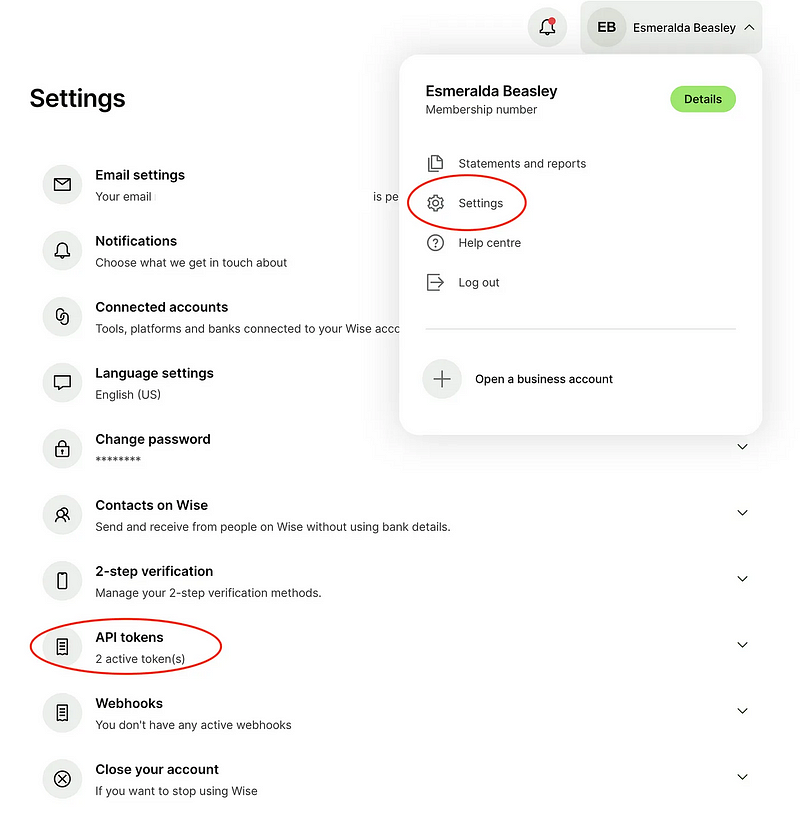
<p>To set up your API keys, first go to “Settings” and then to “API tokens”:</p>

<p><img src="/assets/images/posts/2023-11-23-wise-1.png" alt="" /></p>

<ul>
  <li>Create a personal API token in Wise</li>
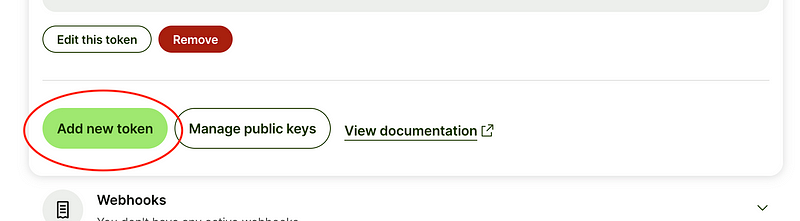
  <li>Click “Add new token”:</li>
</ul>

<p><img src="/assets/images/posts/2023-11-23-wise-2.png" alt="" /></p>

<ul>
  <li>Add a new token in Wise.com</li>
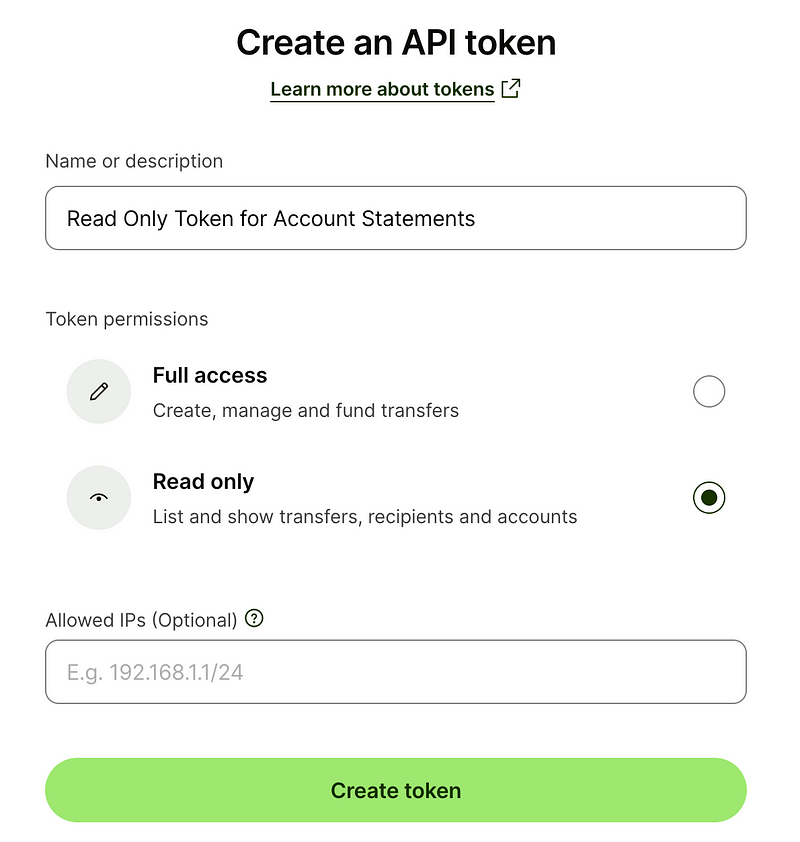
  <li>Read Only Access for the new token is sufficient:</li>
</ul>

<p><img src="/assets/images/posts/2023-11-23-wise-3.png" alt="" /></p>

<ul>
  <li>Read Only Token for wise.com API</li>
</ul>

<p>In addition to backing up the token in a password manager, you will also need to
generate a public key. The most convenient way to do this is by cloning my
GitHub repository containing the script and creating the key directly within
that environment:</p>

<div class="language-plaintext highlighter-rouge"><div class="highlight"><pre class="highlight"><code>git clone https://github.com/thomaswitt/wise-statement-downloader.git
cd wise-statement-downloader
mkdir certs
openssl genrsa -out certs/wise-private.pem 2048
openssl rsa -pubout -in certs/wise-private.pem -out certs/wise-public.pemMake sure you’ll also backup the newly created RSA key.

That’s essentially all there is to it. After completing these steps, you can run the script to easily obtain your first account statement:

thomas@mac:~/Dev/wise-statement-downloader(main) $ ./wise.bash test
*** Using Sandbox API Environment
WISE Personal API Token: [CONCEALED]
Choose account:
1: Esmeralda Beasley (2023) (17012841)
Your choice: 1

Choose year for the statement:
1: 2023
Your choice: 1

Choose currency:
1: AUD (1000000.00 AUD) (179137)
2: EUR (1000000.00 EUR) (179096)
3: GBP (1000000.00 GBP) (179136)
4: USD (1000000.00 USD) (179097)
Your choice: 2
Chosen currency: EUR

*** Writing PDF file to output/Wise-17012841-Esmeralda\_Beasley-EUR-2023.pdf
</code></pre></div></div>

<p>The script currently supports downloading annual statements, but it can be
easily modified for monthly intervals by adjusting the $STATEMENT_DETAILS
variable.</p>

<p>Now just repeat these steps in your main production account — and you’re good to
go.</p>

<p>Enjoy the convenience!</p>]]></content><author><name>Thomas Witt</name></author><category term="tech" /><summary type="html"><![CDATA[I utilize Wise.com (formerly Transferwise) for managing several business accounts and find it generally reliable and efficient, except for some initial account setup annoyances. A recurring challenge is downloading account statements, which involves multiple steps and clicks, particularly when dealing with multiple currencies. To streamline this process, I developed a script for automated downloads.]]></summary></entry><entry><title type="html">How to monitor and remove unwanted Launch Agents and Daemons in macOS</title><link href="https://thomas-witt.com/blog/how-to-monitor-and-remove-unwanted-launch-agents-and-daemons-in-macos/" rel="alternate" type="text/html" title="How to monitor and remove unwanted Launch Agents and Daemons in macOS" /><published>2023-11-04T00:00:00+08:00</published><updated>2025-04-21T17:05:23+08:00</updated><id>https://thomas-witt.com/blog/how-to-monitor-and-remove-unwanted-launch-agents-and-daemons-in-macos</id><content type="html" xml:base="https://thomas-witt.com/blog/how-to-monitor-and-remove-unwanted-launch-agents-and-daemons-in-macos/"><![CDATA[<p>Many macOS software installers add unnecessary background processes, such as
auto-updaters, which can be intrusive or even spyware. These “helpers” typically
install in the directories: <em>LaunchAgents</em>, <em>LaunchDaemons</em>, or
<em>PrivilegedHelperTools</em>, found in <em>/</em>Library or <em>$HOME/Library</em>. To find and
potentially remove them, you have to check these locations regularly.</p>

<p>I created a script for my .bash_profile or .zshrc (works both via bash and zsh)
to track new, unwanted additions. It doesn’t automatically delete these items
but provides removal commands every time I open a shell, which is frequently. Of
course, you could also automatically remove them if you don’t want to manually
double-check.</p>

<p>Notice: This script does not affect Login Items (accessible through System
Preferences &gt; Users &amp; Groups &gt; Login Items), where applications can be set to
launch at startup and also install background daemons (often for AppStore-based
Apps). Additionally, I created an alias to monitor these via the command line as
well (<em>show_background_tasks</em>).</p>

<p>Enjoy!</p>

<div class="language-bash highlighter-rouge"><div class="highlight"><pre class="highlight"><code><span class="c">#!/usr/bin/env bash</span>

<span class="c"># Remove unwanted helpers</span>
process_agents<span class="o">()</span> <span class="o">{</span>
  <span class="nb">local </span><span class="nv">directory</span><span class="o">=</span><span class="nv">$1</span>
  <span class="nb">shift
  local </span><span class="nv">agents</span><span class="o">=(</span><span class="s2">"</span><span class="nv">$@</span><span class="s2">"</span><span class="o">)</span>
  <span class="nb">local </span><span class="nv">pattern</span><span class="o">=</span><span class="si">$(</span>
    <span class="nv">IFS</span><span class="o">=</span><span class="se">\|</span>
    <span class="nb">echo</span> <span class="s2">"</span><span class="k">${</span><span class="nv">agents</span><span class="p">[*]</span><span class="k">}</span><span class="s2">"</span>
  <span class="si">)</span>
  <span class="nb">shopt</span> <span class="nt">-s</span> nullglob
  <span class="k">for </span>plist <span class="k">in</span> <span class="s2">"</span><span class="nv">$directory</span><span class="s2">"</span>/<span class="o">{</span>LaunchAgents,LaunchDaemons,PrivilegedHelperTools<span class="o">}</span>/<span class="k">*</span><span class="p">;</span> <span class="k">do
    if</span> <span class="o">[</span> <span class="o">!</span> <span class="nt">-s</span> <span class="s2">"</span><span class="nv">$plist</span><span class="s2">"</span> <span class="o">]</span><span class="p">;</span> <span class="k">then continue</span><span class="p">;</span> <span class="k">fi
    if</span> <span class="o">!</span> <span class="nb">echo</span> <span class="s2">"</span><span class="nv">$plist</span><span class="s2">"</span> | egrep <span class="nt">-q</span> <span class="s2">"^.*Library.*/(</span><span class="nv">$pattern</span><span class="s2">)"</span><span class="p">;</span> <span class="k">then
      </span><span class="nb">local </span><span class="nv">plist_name</span><span class="o">=</span><span class="si">$(</span><span class="nb">basename</span> <span class="s2">"</span><span class="nv">$plist</span><span class="s2">"</span> .plist<span class="si">)</span>
      <span class="k">if</span> <span class="o">[[</span> <span class="nv">$directory</span> <span class="o">=</span> /Library<span class="k">*</span> <span class="o">]]</span><span class="p">;</span> <span class="k">then
        </span><span class="nb">echo</span> <span class="s2">"sudo bash -c 'launchctl disable system/</span><span class="nv">$plist_name</span><span class="s2"> &amp;&amp; true &gt; </span><span class="se">\"</span><span class="nv">$plist</span><span class="se">\"</span><span class="s2"> &amp;&amp; chmod a-wx </span><span class="se">\"</span><span class="nv">$plist</span><span class="se">\"</span><span class="s2">'"</span>
      <span class="k">else
        </span><span class="nb">echo</span> <span class="s2">"bash -c 'launchctl disable gui/</span><span class="si">$(</span><span class="nb">id</span> <span class="nt">-u</span><span class="si">)</span><span class="s2">/</span><span class="nv">$plist_name</span><span class="s2"> &amp;&amp; true &gt; </span><span class="se">\"</span><span class="nv">$plist</span><span class="se">\"</span><span class="s2"> &amp;&amp; chmod a-wx </span><span class="se">\"</span><span class="nv">$plist</span><span class="se">\"</span><span class="s2">'"</span>
      <span class="k">fi
    fi
  done</span>
<span class="o">}</span>

<span class="c"># Define global and local agents to manage</span>
<span class="nv">global_agents</span><span class="o">=(</span>
  at.obdev.littlesnitch         <span class="c"># Little Snitch</span>
  com.docker                    <span class="c"># Docker</span>
<span class="o">)</span>
process_agents <span class="s2">"/Library"</span> <span class="s2">"</span><span class="k">${</span><span class="nv">global_agents</span><span class="p">[@]</span><span class="k">}</span><span class="s2">"</span>

<span class="nv">local_agents</span><span class="o">=(</span>
  homebrew.mxcl.ollama        <span class="c"># ollama</span>
  jp.plentycom.boa.SteerMouse <span class="c"># SteerMouse</span>
<span class="o">)</span>
process_agents <span class="s2">"</span><span class="nv">$HOME</span><span class="s2">/Library"</span> <span class="s2">"</span><span class="k">${</span><span class="nv">local_agents</span><span class="p">[@]</span><span class="k">}</span><span class="s2">"</span>

<span class="c"># vim: filetype=bash:</span>
</code></pre></div></div>]]></content><author><name>Thomas Witt</name></author><category term="tech" /><summary type="html"><![CDATA[Many macOS software installers add unnecessary background processes, such as auto-updaters, which can be intrusive or even spyware. These “helpers” typically install in the directories: LaunchAgents, LaunchDaemons, or PrivilegedHelperTools, found in /Library or $HOME/Library. To find and potentially remove them, you have to check these locations regularly.]]></summary></entry><entry><title type="html">Investing in Supernova</title><link href="https://thomas-witt.com/blog/investing-in-supernova/" rel="alternate" type="text/html" title="Investing in Supernova" /><published>2022-11-16T00:00:00+08:00</published><updated>2025-04-16T01:18:53+08:00</updated><id>https://thomas-witt.com/blog/investing-in-supernova</id><content type="html" xml:base="https://thomas-witt.com/blog/investing-in-supernova/"><![CDATA[<p>At Expedite Ventures, we love DevTools. We especially love DevTools which
promote cross-functionality by bringing developers together with other creative
colleagues.</p>

<p>And this is exactly what our portfolio company
<a href="https://supernova.io/">Supernova</a> does — in this case it’s bridging the gap
between designers and developers. The connection between those two is an
extremely important one in the world of ever-more important UX — and still, the
disconnect sometimes couldn’t be bigger, particularly in larger organizations.
And that leads to broken, inconsistent user experiences — because it’s simply
hard to manage and update a consistent design over its complete lifecycle.</p>

<p>Supernova actually helps designers and developers to work better together in the
context of a so-called design system. Those have become the hot topic in the
recent years. A design system is a shared language, a set of standards to create
beautiful visual experiences, based on reusable components and patterns. It’s
the final source of through about the design language of a company. At scale.</p>

<p>Supernova helps managing and documenting the entire lifecycle of a Design System
centralized in one place without changing workflows or tools like Figma.</p>

<p>For a developer that means if a refinement of a design is to be rolled out,
you’ll get an automated export delivery of tokens, styles, assets and code to
handover to the developers. So your flutter-based mobile apps will get the same
updates like your website, and developers get everything served on a silver
plate in form of a GitHub pull request. Cool, eh?</p>

<p>And that kind of cooperation doesn’t only make the designers and developers
happy, but also the management of a company. Because they get not only higher
quality through visual consistency across multiple products and channels,
they’ll also save a ton of money. That’s why they keep on convincing more and
more large name brands. And with their latest
<a href="https://www.supernova.io/design-tokens">announcement</a> of their design token
manager with support for Figma Tokens plugin and themes, they’ll continue to
lead the space for Design Systems.</p>

<p>That’s why we are incredibly excited and honored to partner with the Supernova
in their $4.8m seed round. Congratulations to Jiri, the Founder and the whole
team. We are looking forward to the journey ahead!</p>

<p>Of course, we at Expedite will continue to keep investing in great DevTools to
make developers and companies more productive and successful.</p>

<p>Further Reading:</p>

<ul>
  <li><a href="https://www.supernova.io/">Supernova.io Homepage</a></li>
  <li><a href="https://www.supernova.io/blog/supernovas-seed-round-and-our-new-design-token-manager">Blog post by Jiri, Founder of Supernova</a></li>
  <li><a href="https://techcrunch.com/2022/11/16/supernova-wants-to-make-it-easy-to-transfer-design-changes-to-code-bases/">TechCrunch: Supernova wants to make it easy to move design elements to code bases</a></li>
</ul>]]></content><author><name>Thomas Witt</name></author><category term="investment" /><summary type="html"><![CDATA[At Expedite Ventures, we love DevTools. We especially love DevTools which promote cross-functionality by bringing developers together with other creative colleagues.]]></summary><media:thumbnail xmlns:media="http://search.yahoo.com/mrss/" url="https://thomas-witt.com/assets/images/posts/2022-11-16-supernova.jpeg" /><media:content medium="image" url="https://thomas-witt.com/assets/images/posts/2022-11-16-supernova.jpeg" xmlns:media="http://search.yahoo.com/mrss/" /></entry><entry><title type="html">Auto-Connect your iOS-Device to a VPN when joining an unknown WiFi</title><link href="https://thomas-witt.com/blog/auto-connect-your-ios-device-to-a-vpn-when-joining-an-unknown-wifi/" rel="alternate" type="text/html" title="Auto-Connect your iOS-Device to a VPN when joining an unknown WiFi" /><published>2017-10-07T00:00:00+08:00</published><updated>2025-04-16T01:18:53+08:00</updated><id>https://thomas-witt.com/blog/auto-connect-your-ios-device-to-a-vpn-when-joining-an-unknown-wifi</id><content type="html" xml:base="https://thomas-witt.com/blog/auto-connect-your-ios-device-to-a-vpn-when-joining-an-unknown-wifi/"><![CDATA[<p>How to always use a VPN and make sure that no single byte is transferred without
an active VPN connection when connecting to a WiFi network (On Demand VPN via
Apple Configuration Profile).</p>

<p>You might be familiar with that situation: You’re at a coffee shop, and airport
or wherever and want to connect to a WiFi.</p>

<p>But once you do so, your iOS device starts broadcasting data over that insecure
network, for example with apps which are using background refresh. Things get
worse when you fire up your web browser and browse on insecure http-Sites.</p>

<p>Congratulations, you just made yourself a target for hackers (and your device
will be
<a href="https://www.welivesecurity.com/2017/09/21/new-finfisher-surveillance-campaigns/">automatically equipped with Malware</a>).
At least anyone on the network can trace which sites you are connecting to. And
worse, your iPhone will still continue to broadcast data over this insecure
connection, even when it’s on standby in your pocket or it reconnects to a
forgotten WiFi-Network you once signed on.</p>

<p>Danger #1 to IT security is connecting to the Internet via public WiFi. Don’t be
tricked to think that’s a problem only existing in shady internet cafes:
<a href="https://www.theguardian.com/technology/2014/nov/10/hotel-wi-fi-infected-business-travellers-asia-kaspersky">Criminals have been targeting business travelers in Asia in 5* Hotels since at least 2009</a>.
Similar things were reported about Russia.</p>

<p>Wherever it is, it can happen everywhere around the world, as soon as you
connect your device to an unknown WiFi network.
<a href="https://www.wifipineapple.com">The tools are widely available</a>, and it’s a
matter of minutes to manipulate networks, intercept connections in order to to
take over your unpatched computers with malware or steal passwords (online
banking, anybody?).</p>

<p>There might be even whole countries (China, anyone?) where you want to use your
connection always with over a VPN enabled, because most web-sites and service
won’t reachable anyway.</p>

<p>So in general: you always want to use a VPN (except in your WiFi network at home
maybe) — and in an ideal world you want to make sure that no single byte is
transferred without an active VPN when connecting to a WiFi network. This is
called an OnDemand VPN.</p>

<p>On the Mac I highly recommend to use
<a href="https://www.obdev.at/products/littlesnitch/index-de.html">Little Snitch</a> and
its <a href="https://blog.obdev.at/automatic-profile-switching/">profile functionality</a>
to achieve exactly that (I’ve wrote
<a href="https://thomas-witt.com/staying-safe-on-your-travels-it-and-physical-security-when-traveling-f1145ae47d4a">an article about Internet security while traveling before</a>).
On iOS devices, it’s unfortunately not that straightforward.</p>

<p>Luckily, iOS devices like iPhones and iPads have a functionality built in which
allows you to do exactly that: Always connect to a VPN except for certain WiFi
networks. Unfortunately it’s only achievable throught a so called profile, which
you have to install manually on your phone — and there’s no graphical user
interface to create such an sophisticated OnDemand profile. So you have to use
your text editor.</p>

<p>So what I did is, I created an easy-to-install profile which gives me access to
three different VPN options:</p>

<ul>
  <li>An IPSec connection to my home router (a
<a href="https://en.avm.de/products/fritzbox/">FRITZ!Box</a>), so I can connect to my
home network (especially useful if you’d like to connect to firewalled devices
such as webcams)</li>
  <li>An L2TP conncetion to our company network router (a
<a href="https://meraki.cisco.com/products/appliances">Cisco Meraki</a>)</li>
  <li>
    <p>An L2TP connection to an
<a href="https://github.com/StreisandEffect/streisand">Streisand</a> powered VPN at
Amazon Web Services — if you’re not familiar with
<a href="https://github.com/StreisandEffect/streisand">Streisand</a>, it’s an open source
tool which creates a cheap AWS EC2 instance with all kinds of way to access it
as a VPN. This is also my default profile, because AWS obviously has the
highest data throughput. For each of these three VPNs I created three options:</p>
  </li>
  <li>Always: Always connect to this VPN, regardless whether you’re on Cellular or
WiFi and regardless of the WiFi network. That’s the most secure option.</li>
  <li>WiFi: Only connect to this VPN when you’re an WiFi and if the network name
isn’t from a specific set of WiFi network names (so you won’t use VPN at home
or in your company).</li>
  <li>
    <p>Manual: Never automatically connect to a VPN, unless you switch it on
manually. That’s your backup, in case you NEED to connect but everything is
blocked. The following profile does all of that. To use it, you have to
perform the following steps:</p>
  </li>
  <li>Get rid of the sections you might not need.</li>
  <li>Change the passwords, usernames and shared secrets to your personal access
credentials (look out for CHANGEME).</li>
  <li>Change the SSIDMatch strings in the WiFi profile to your WiFi network names
you’d like to exclude from the VPN-obligation.</li>
  <li>Save this text file as VPNConfigurationProfiles.mobileconfig (the suffix is
important).</li>
  <li>Upload the profile via AirDrop to your iPhone or iPad (you have to enter your
device passcode to install). I usually leave my devices at “AWS: WiFi”. So at
home, I’m surfing without a VPN, same applies to any cellular connections, but
whenever I connect to a WiFi, my Streisand AWS VPN is used.</li>
</ul>

<p>What are the downsides? Not many. There might be some strange WiFis with a
splash page, which is not correctly recognized by your iOS device as such. So
the VPN tries to connect but gets blocked because you haven’t confirmed on the
splash page. So either you don’t use the WiFi or switch to manual, confirm the
splash and switch back to the original WiFi VPN profile. Needless to say, that’s
not perfectly secure.</p>

<p>You can actually set even more options in the profile, such as limiting VPN
usage to certain domain names or to certain apps. You’ll find all parameters in
the (very long)
<a href="https://developer.apple.com/library/content/featuredarticles/iPhoneConfigurationProfileRef/Introduction/Introduction.html">Configuration Profile Reference documentation at Apple</a>.</p>

<p>So stay safe and always use a VPN — here is
<a href="https://gist.github.com/thomaswitt/2f847199863a103dfcf004fec3c538d0">the profile</a>.</p>

<h3 id="update">Update</h3>

<p>Check out <a href="https://twitter.com/klinquist">Kris</a> cool generator for profiles:
<a href="https://t.co/e5QU6Hb7Dl">https://t.co/e5QU6Hb7Dl</a></p>]]></content><author><name>Thomas Witt</name></author><category term="tech" /><summary type="html"><![CDATA[How to always use a VPN and make sure that no single byte is transferred without an active VPN connection when connecting to a WiFi network (On Demand VPN via Apple Configuration Profile).]]></summary></entry><entry><title type="html">Turning your Raspberry Pi into a Dashboard</title><link href="https://thomas-witt.com/blog/turning-your-raspberry-pi-into-a-dashboard/" rel="alternate" type="text/html" title="Turning your Raspberry Pi into a Dashboard" /><published>2016-11-15T00:00:00+08:00</published><updated>2025-04-16T01:18:53+08:00</updated><id>https://thomas-witt.com/blog/turning-your-raspberry-pi-into-a-dashboard</id><content type="html" xml:base="https://thomas-witt.com/blog/turning-your-raspberry-pi-into-a-dashboard/"><![CDATA[<p>In the Scrivito office at Infopark in Berlin, we love dashboards. Here’s our
recipe how we set up our Raspberry Pi’s for Geckoboard. It only takes about 10
minutes. In the <a href="https://scrivito.com">Scrivito</a> office at
<a href="https://infopark.com">Infopark</a> in Berlin, we love dashboards. We’ve put a lot
of them in our office so everybody knows if our systems are up and running, if
our office internet connections are doing okay — or sometimes people just take a
look know what time it is. Short: A dashboard is a must-have for any SaaS
company.</p>

<p>We’re using <a href="https://medium.com/u/bfb03fc87209">Geckoboard</a> to cloud-power our
dashboard. It’s only $25/month and it includes great functionalities. They offer
you a lot more out-of-the-box than you could manually build for 25 bucks. So get
an account and sign up.</p>

<p>But having a great dashboard only brings you so far — the question is, how to
visualise it. We’ve already got a lot of TV screens in every room (which are
powered by AppleTVs and AirPlay, so we don’t need any HDMI cables).</p>

<p>So we looked for a cheap, reliable and easy solution to display our dashboards
on these screens. And what could be better suited as a
<a href="http://amzn.to/2ezt5CE">Raspberry Pi 3</a>.</p>

<p>Of course you don’t want to spend a lot of time to manually set up a dashboard —
and you’d like to display it automatically in full screen on your beautiful HD
display.</p>

<p>So here’s our recipe how we set up our Raspberry Pi’s for Geckoboard. It only
takes about 10 minutes.</p>

<h4 id="sd-card-preparations-on-your-mac">SD card preparations on your Mac</h4>

<p>Find out using Disk Utility.app or <em>diskutil list</em>, which /dev at device your SD
card is mounted. Mine mounts usually at rdisk2, so first download the package,
unzip it and transfer it to the SD card:</p>

<div class="language-plaintext highlighter-rouge"><div class="highlight"><pre class="highlight"><code>wget
[https://downloads.raspberrypi.org/raspbian_latest](https://downloads.raspberrypi.org/raspbian_latest)
unzip
raspbian*latest # and insert SD using an adapter into MBPdiskutil unmountDisk
/dev/rdisk2
dd bs=1m if=2016-09-23-raspbian-jessie.img of=/dev/rdisk2
diskutil eject /dev/rdisk2
</code></pre></div></div>

<p><strong>Pro tip</strong>: After the installation is done, you can again clone the SD card
using _dd*, copy it to more SD cards and effectively cloning your Pi.</p>

<h4 id="remote-installation-via-ssh"><strong>Remote Installation via ssh</strong></h4>

<p>Hook up your Pi via Ethernet to your network, find out its IP and do the rest of
the installation via SSH and change your password immediately (Tip: Use
<a href="https://1password.com">1Password</a> to create and store secure passwords):</p>

<div class="language-plaintext highlighter-rouge"><div class="highlight"><pre class="highlight"><code>ssh pi@&lt;ipaddress&gt; # password: raspberrypasswdFirst of all you should create an
ssh directory and upload your ssh keys, e.g.:

mkdir .ssh
cat &gt;.ssh/authorized_keys &lt;&lt;EOF
ssh-ed25519 ssh-ed25519 AAAAC\_\_REPLACE_WITH_YOUR_KEY\_\_pm4tj56K87GzrK
EOFBackup the autostart file and replace it with your own so that Chrome boots
up straight when booting the Pi (change your URL to your
[Geckoboard sharing URL](https://support.geckoboard.com/hc/en-us/articles/202333706-Sharing-a-dashboard-Secure-sharing-links-)):

cp .config/lxsession/LXDE-pi/autostart
.config/lxsession/LXDE-pi/autostart.distcat &gt;.config/lxsession/LXDE-pi/autostart
&lt;&lt;EOF
@chromium-browser --kiosk --disable-overlay-scrollbar --noerrdialogs
--disable-session-crashed-bubble --disable-infobars
&lt;https://mycompany.geckoboard.com/dashboards/YOUR\_URL&gt;
@unclutter -idle 0
EOF
</code></pre></div></div>

<p>If you’ve got a fixed IP internet connection, you might want to set up
<a href="https://support.geckoboard.com/hc/en-us/articles/202136993-IP-restrictions-Restrict-access-to-your-dashboards-by-IP-address-">IP restrictions</a>
to access the dashboard in your Geckoboard configuration.</p>

<p>Afterwards we’ll secure the system, update to the latest package versions and
install some convenience stuff:</p>

<div class="language-plaintext highlighter-rouge"><div class="highlight"><pre class="highlight"><code>
</code></pre></div></div>

<p>sudo su -passwd # Change to your new root passwordapt-get update -y ; apt-get
dist-upgrade -y ; apt-get autoremove -yapt-get install x11-xserver-utils
unclutter ttf-mscorefonts-installer x11vnc xterm vim screen dnsutils rcconf
silversearcher-ag mlocate</p>

<div class="language-plaintext highlighter-rouge"><div class="highlight"><pre class="highlight"><code>
</code></pre></div></div>

<p>Then start <em>raspi-config</em> and do some basic configuration:</p>

<ul>
  <li>7 Advanced Options &gt; A2 Hostname &gt; <em>dashboard</em> (or whatever)</li>
  <li>3 Boot Options &gt; B1 Desktop/CLI &gt; B4 Desktop Autologin</li>
  <li>4 Intl Options &gt; I1 Change Locale (I usually disable en_GB using the space
key, enable en_US.UTF8, fallback C.UTF8)</li>
  <li>4 Intl Options &gt; I2 Change Timezone (in our case Europe/Berlin)</li>
  <li>4 Intl Options &gt; I4 Change Wi-fi Country (in our case DE — Germany)</li>
  <li>Reboot now After rebooting, your dashboard should already show a Geckoboard
screen. It still looks ugly, has scrollbars and no fullscreen, but no worries,
we’ll get there in a moment!</li>
</ul>

<p>I’ve got some <a href="https://github.com/thomaswitt/dotfiles">convenience dotfiles</a>
including aliases in bashrc and my vimrc. I can’t live without these — you might
have your own version of your preferred bashrc file, feel free to skip this
step:</p>

<div class="language-plaintext highlighter-rouge"><div class="highlight"><pre class="highlight"><code>sudo su -curl -so /etc/bashrc.local
&lt;https://raw.githubusercontent.com/thomaswitt/dotfiles/master/etc/bashrc.local&gt;
echo
"test -e \"/etc/bashrc.local\" &amp;&amp; . /etc/bashrc.local" &gt;&gt;/etc/bash.bashrccp
/etc/vim/vimrc /etc/vim/vimrc.dist
curl -so /etc/vim/vimrc
&lt;https://raw.githubusercontent.com/thomaswitt/dotfiles/master/etc/vimrc&gt;
</code></pre></div></div>

<p>Now we’re going to harden the ssh daemon: No root login, only secure ciphers,
etc. — <strong>Do not skip this step! Security is important!</strong>Make sure that you’ve
uploaded your ssh key before and tested in a new shell that your ssh login is
still working. Otherwise you’ll lock yourself out from your Pi.</p>

<div class="language-plaintext highlighter-rouge"><div class="highlight"><pre class="highlight"><code>cp /etc/ssh/ssh_config /etc/ssh/ssh_config.dist
curl -so /etc/ssh/ssh_config
[https://raw.githubusercontent.com/thomaswitt/dotfiles/master/etc/ssh/ssh_config](https://raw.githubusercontent.com/thomaswitt/dotfiles/master/etc/ssh/ssh_config)cp
/etc/ssh/sshd_config /etc/ssh/sshd_config.dist
curl -so /etc/ssh/sshd_config
&lt;https://raw.githubusercontent.com/thomaswitt/dotfiles/master/etc/ssh/sshd\_config&gt;
| grep -v AllowUsers &gt;/etc/ssh/sshd_config
echo "DebianBanner no" &gt;&gt; /etc/ssh/sshd_config/etc/init.d/ssh restart# Remove
some annoying messages and replace by a security warning
true &gt;/etc/motd
curl -so /etc/issue.net
&lt;https://raw.githubusercontent.com/thomaswitt/dotfiles/master/etc/issue.net&gt;
</code></pre></div></div>

<p>Let’s now fine-tune the X11 config that the screen doesn’t go blank, the cursor
doesn’t show and we’re going to have a nice HDMI display:</p>

<div class="language-plaintext highlighter-rouge"><div class="highlight"><pre class="highlight"><code>cat &gt;/etc/xdg/lxsession/LXDE-pi/autostart &lt;&lt;EOF
@lxpanel --profile LXDE-pi
@pcmanfm --desktop --profile LXDE-pi
@xset s off
@xset -dpms
@xset s noblank
@sed -i 's/"exited_cleanly": false/"exited_cleanly": true/'
~/.config/chromium/Default/Preferences
EOFcp /etc/lightdm/lightdm.conf /etc/lightdm/lightdm.conf.dist
sed -i 's/#xserver-command=X/xserver-command=X -s 0 dpms/'
/etc/lightdm/lightdm.confcp /boot/config.txt /boot/config.txt.dist
sed -i 's/#hdmi_force_hotplug=1/hdmi_force_hotplug=1/' /boot/config.txt
sed -i 's/#disable_overscan=1/disable_overscan=1/' /boot/config.txt
sed -i 's/#config_hdmi_boost=4/config_hdmi_boost=4/' /boot/config.txt
</code></pre></div></div>

<p>Then we’d like to check whether our network is already available at boot in
order to avoid annoying Chrome error messages:</p>

<div class="language-plaintext highlighter-rouge"><div class="highlight"><pre class="highlight"><code>cat &gt;/boot/IPCheck.py &lt;&lt;EOF#!/usr/bin/env python
import socket
from time import sleepdef checknetwork():
 ip = False
 try:
 s = socket.socket(socket.AF_INET, socket.SOCK_DGRAM)
 s.connect(('google.com', 0))
 ip = s.getsockname()[0]
 s.close()
 except socket.error:
 return False
 else:
 return ipdef main():
 x = checknetwork()
 while x == False:
 print "Checking network ..."
 x = checknetwork()
 sleep(1)
EOF
chmod +x /boot/IPcheck.pycp /etc/rc.local /etc/rc.local.dist
sed -i 's/# By default this script does nothing./\/usr\/bin\/python
\/boot\/IPcheck.py/' /etc/rc.local
</code></pre></div></div>

<p>We’re nearly there. Additionally, we’re blanking our screens at night in order
to save some energy:</p>

<div class="language-plaintext highlighter-rouge"><div class="highlight"><pre class="highlight"><code>cat &gt;/usr/local/bin/screen.sh &lt;&lt;EOF

# !/bin/bash

if [ \$# -lt 1 ]; then
 echo "Syntax: \$0 (on|off)"
 exit
fi

if [ \$1 == "on" ]; then
 tvservice -p
 sleep 2
 chvt 6 &amp;&amp; chvt 7
 echo "Switched HDMI on"
fi

if [ \$1 == "off" ]; then
 tvservice -o
 echo "Switched HDMI off"
fi
EOF
chmod +x /usr/local/bin/screen.shcrontab &lt;&lt;EOF
0 19 \* \* _/usr/local/bin/screen.sh off &gt;/dev/null
0 8_ \* \* /usr/local/bin/screen.sh on &gt;/dev/null
EOF
</code></pre></div></div>

<p>That’s it. Let’s reboot one last time:</p>

<p><code class="language-plaintext highlighter-rouge">rebootr</code> … and your dashboard should shine! Happy dash-boarding!</p>

<h4 id="additional-notes">Additional notes</h4>

<p>If you’d like to use the WiFi of the Raspberry Pi 3 instead of ethernet, the
configuration works like this:</p>

<div class="language-plaintext highlighter-rouge"><div class="highlight"><pre class="highlight"><code>sed -i 's/iface wlan0 inet manual/iface wlan0 inet dhcp/'
/etc/network/interfaces# Change SSID, PSK and country
cat &gt;/etc/wpa_supplicant/wpa_supplicant.conf &lt;&lt;EOF
country=de
network={
 ssid="YOUR_WIRELESS_NETWORK_NAME"
 psk="YOUR_WIRELESS_NETWORK_PASSWORD"
 proto=RSN
 key_mgmt=WPA-PSK
 pairwise=CCMP
 auth_alg=OPEN
}
EOF
</code></pre></div></div>

<p>If you need a terminal, e.g. to copy/paste login information:</p>

<div class="language-plaintext highlighter-rouge"><div class="highlight"><pre class="highlight"><code>x11vnc -usepw -forever -display :0 # choose password
export DISPLAY=”:0”
xterm
</code></pre></div></div>

<p>Open the connection on your Mac via:</p>

<div class="language-plaintext highlighter-rouge"><div class="highlight"><pre class="highlight"><code>open vnc://HOSTNAME.local
</code></pre></div></div>]]></content><author><name>Thomas Witt</name></author><category term="tech" /><summary type="html"><![CDATA[In the Scrivito office at Infopark in Berlin, we love dashboards. Here’s our recipe how we set up our Raspberry Pi’s for Geckoboard. It only takes about 10 minutes. In the Scrivito office at Infopark in Berlin, we love dashboards. We’ve put a lot of them in our office so everybody knows if our systems are up and running, if our office internet connections are doing okay — or sometimes people just take a look know what time it is. Short: A dashboard is a must-have for any SaaS company.]]></summary><media:thumbnail xmlns:media="http://search.yahoo.com/mrss/" url="https://thomas-witt.com/assets/images/posts/2016-11-15-Scrivito-Office.jpeg" /><media:content medium="image" url="https://thomas-witt.com/assets/images/posts/2016-11-15-Scrivito-Office.jpeg" xmlns:media="http://search.yahoo.com/mrss/" /></entry><entry><title type="html">Remote Control your Jura Impressa S95 Coffee Maker with Siri via Homekit and Arduino</title><link href="https://thomas-witt.com/blog/remote-control-your-jura-impressa-s95-coffee-maker-with-siri-via-homekit-and-arduino/" rel="alternate" type="text/html" title="Remote Control your Jura Impressa S95 Coffee Maker with Siri via Homekit and Arduino" /><published>2016-11-10T00:00:00+08:00</published><updated>2025-04-16T01:18:53+08:00</updated><id>https://thomas-witt.com/blog/remote-control-your-jura-impressa-s95-coffee-maker-with-siri-via-homekit-and-arduino</id><content type="html" xml:base="https://thomas-witt.com/blog/remote-control-your-jura-impressa-s95-coffee-maker-with-siri-via-homekit-and-arduino/"><![CDATA[<p>I love home automatization. And I always liked to play around with electronics,
since I was a little child. So when I bought my coffee machine, a Jura Impressa
S95, a long time ago, I always noticed… I love home automatization. And I always
liked to play around with electronics, since I was a little child. So when I
bought my coffee machine, a Jura Impressa S95, a long time ago, I always noticed
this “Service Port — do not touch” sign. I always wanted to play around with it,
but didn’t have the time.</p>

<p>When I found that some people did <a href="https://github.com/psct/sharespresso">some</a>
<a href="https://github.com/oliverk71/Coffeemaker-Payment-System">research</a> on this
topic and found out, that the machine is completely remote-controllable through
this (undocumented) port -which is a 9600bps serial interface-, I thought I’d
solve a first-world problem which always annoyed me: After I wake up and go to
the kitchen, I’ll have to wait until the S95 has warmed up, until I can make
coffee.</p>

<p>So on a rainy sunday, I thought I’d automatize this and integrate the S95 into
my Siri Homekit setup.</p>

<p>I needed the following parts:</p>

<ul>
  <li>An <a href="http://amzn.to/2g1pDkH">Arduino Uno Wifi</a></li>
  <li>A <a href="http://amzn.to/2eWgiX3">Raspberry Pi 3</a> running the Siri Homekit Emulation
<a href="https://github.com/nfarina/homebridge">Homebridge</a></li>
  <li>A <a href="https://bit.ly/S95Connector">four-pin 2.54mm connection cable</a> for the
service port And here we go. First of all, I have to say, that as much as I
love Arduino, the Arduino Uno Wifi is the worst documented product I’ve ever
bought. I’ve spent a considerable amount of time in figuring out libraries
near-to-nonexistant
<a href="http://www.arduino.org/products/boards/arduino-uno-wifi">documentation which only consists of a few examples</a>.</li>
</ul>

<p>But after a while, I’ve figured out how it works. Of course, if you’ll try that
at home, that’s at your own risk, this description comes without any warranty.
If you’ll send the wrong commands to the S95 or connect the wrong wires, you
might very well destroy your Arduino and your S95. So be careful.</p>

<h3 id="part-1-arduino-uno-wifi">Part 1: Arduino Uno Wifi</h3>

<p>After you connect the Arduino Uno Wifi to a power source, it’ll automatically
create a WiFi network.</p>

<p>You’ll have to log onto that network and
<a href="http://www.arduino.org/learning/getting-started/getting-started-with-arduino-uno-wifi">configure the connection to your home network via a browser</a>
(set hostname, DHCP, etc.).</p>

<p>After that, you’ll have to upload the
<a href="https://github.com/thomaswitt/CoffeeMaker/blob/master/CoffeeMaker.ino">Coffemaker.ino sketch</a>
I’ve uploaded
<a href="https://github.com/thomaswitt/CoffeeMaker">to a GitHub repository</a>:</p>

<p><a href="https://github.com/thomaswitt/CoffeeMaker">https://github.com/thomaswitt/CoffeeMaker</a>This sketch turns the Arduino into a
REST server for the coffee maker. Clone the Repo and upload the sketch to the
Arduino Uno Wifi using the standard IDE for the Mac:</p>

<p><img src="/assets/images/posts/2016-11-10-arduino.jpeg" alt="Arduino Uno Wifi" /></p>

<h3 id="part">Part</h3>

<p>2: Connect the Arduino to the S95</p>

<p>That’s pretty straightforward. Use the <a href="https://bit.ly/S95Connector">cable</a>
mentioned above and plug it into the S95 service port. S95-Pin 4 is on the left,
S95-Pin 1 on the right.</p>

<p><img src="/assets/images/posts/2016-11-10-service-port-1.jpeg" alt="Service Port" /></p>

<p><img src="/assets/images/posts/2016-11-10-service-port-2.jpeg" alt="Jura Impressa S95 Service Port" /></p>

<p>We don’t need Pin 4 and the rest connects as follows:</p>

<ul>
  <li>S95-Pin 3 connects to Arduino Pin #3</li>
  <li>S95-Pin 2 connects to Arduino GND</li>
  <li>S95-Pin 1 coneects to Arduino Pin #2 That’s it. I’ve soldered a pin at the end
of the connection cable to make a better connection to the Arduino and
isolated it with Heat-shrink tubing.</li>
</ul>

<p>After you’ve powered your Arduino, you should be able to test the connection
using your command line (or simply your browser):</p>

<p><code class="language-plaintext highlighter-rouge">curl &lt;http://ARDUINO.IP.ADDRESS.HERE/arduino/custom/turn\_onshould&gt;</code> turn on
the S95 and</p>

<p><code class="language-plaintext highlighter-rouge">curl &lt;http://ARDUINO.IP.ADDRESS.HERE/arduino/custom/turn\_offturns&gt;</code> it off.
Besides <em>turn_on</em> and <em>turn_off</em> the commands <em>flush</em> and <em>make_coffee</em> are
supported as well.</p>

<p>Go ahead and try it, it should work by now — or you’ll have to go for some
debugging. You can also use hostname.local instead of the IP address in the curl
request.</p>

<p><img src="/assets/images/posts/2016-11-10-install.jpeg" alt="Jura Impressa S95 connected to an Arduino Uno Wifi" /></p>

<h3 id="part-3-connecting-homebridge-to-the-arduino">Part 3: Connecting Homebridge to the Arduino</h3>

<p><a href="https://github.com/nfarina/homebridge">Homebridge</a> is an Open Source
reverse-engineered implementation of Apple’s Homekit, which allows you to
integrate custom stuff into Siri. I’ve installed it on my Raspberry Pi 3,
straightforward after installing the newest
<a href="https://www.raspberrypi.org/downloads/raspbian/">Jessie-Version of Raspbian Linux</a>,
following
<a href="https://github.com/nfarina/homebridge/wiki/Running-HomeBridge-on-a-Raspberry-Pi">the installation docs for the Pi and running it on boot</a>-up
using systemctl.</p>

<p>After that has been done, you’ll have to install just have to install the
<a href="https://github.com/rudders/homebridge-http">homebridge-http plugin</a> on your Pi:</p>

<p><code class="language-plaintext highlighter-rouge">npm install -g homebridge-http</code></p>

<p>After replacing the standard homebridge config.json configuration with
<a href="https://github.com/thomaswitt/CoffeeMaker/blob/master/homebridge-config.json">my homebridge configuration</a>
you’ll have to restart the homebridge server:</p>

<p><code class="language-plaintext highlighter-rouge">systemctl restart homebridge</code></p>

<h3 id="part-4-ask-siri-to-turn-on-the-coffeemaker">Part 4: Ask Siri to turn on the coffeemaker</h3>

<p>Now you should be able to start your iOS 10 “Home”-App on your iPhone, and you
can add the new Homebridge Pi Server as a new device. Use the standard code
031–45–154 (changeable in the config.json) and you’re good to go by saying “Hey
Siri, turn on the coffeemaker!” (or in my case, in german):</p>

<p>Video of remotely controlling a Jura Impressa S95 Coffee Maker with Siri via
Homekit and Arduino</p>

<p>That’s it.</p>

<p>What’s currently missing is a status report back to HomeKit about the current
status of the machine. That’s unfortunately not so easy as there’s no
documentation about the internal status codes of the S95.</p>

<p>If you figure something out regarding the status codes, let me know!</p>]]></content><author><name>Thomas Witt</name></author><category term="tech" /><summary type="html"><![CDATA[I love home automatization. And I always liked to play around with electronics, since I was a little child. So when I bought my coffee machine, a Jura Impressa S95, a long time ago, I always noticed… I love home automatization. And I always liked to play around with electronics, since I was a little child. So when I bought my coffee machine, a Jura Impressa S95, a long time ago, I always noticed this “Service Port — do not touch” sign. I always wanted to play around with it, but didn’t have the time.]]></summary><media:thumbnail xmlns:media="http://search.yahoo.com/mrss/" url="https://thomas-witt.com/assets/images/posts/2016-11-10-ImpressaS95.jpeg" /><media:content medium="image" url="https://thomas-witt.com/assets/images/posts/2016-11-10-ImpressaS95.jpeg" xmlns:media="http://search.yahoo.com/mrss/" /></entry><entry><title type="html">How we hire at Scrivito</title><link href="https://thomas-witt.com/blog/how-we-hire-at-scrivito/" rel="alternate" type="text/html" title="How we hire at Scrivito" /><published>2016-04-27T00:00:00+08:00</published><updated>2025-04-16T01:18:53+08:00</updated><id>https://thomas-witt.com/blog/how-we-hire-at-scrivito</id><content type="html" xml:base="https://thomas-witt.com/blog/how-we-hire-at-scrivito/"><![CDATA[<p>I hire people since 20 years. I’ve co-founded a software company in the 90ies
which is still doing pretty great. Beeing responsible for our software products,
I’ve conducted hundereds of job interviews in the last years.</p>

<p>Frankly, I don’t understand why interviews are nowadays appearently done the way
they are done. This reminds me a bit of high school, when you had to learn a lot
of useless stuff just for the sake of it. Especially in the fast-changing tech
world that’s superfluous. If I need a certain algorithm, I just look it up.
That’s what the Internet is there for, right? Knowing it out of the blue is
great and maybe important for 1% of super algorithm-heavy jobs, but definitely
not for the majority of programming jobs. And particularly not for a front-end
developer.</p>

<p>I definitely prefer interviews the informal way, like you described your first
interviews at Vimeo. I’m interested in the experiences people had and how they
learned new things. A good programmer can (and has to) definitely always learn
any new stuff, so I’m rather interested in how curious people think, their
ability to learn stuff in the future and not what they already know. I
definitely don’t believe in some strange whiteboard exercises (which maybe the
interviewers wouldn’t pass themselves). If you’ve got your fine projects on
GitHub and I can take a look at them, I know that you know how to code.</p>

<p>I’m also a bit astonished of the complete lack of any social compatibility
questions in the interviews you’ve experienced. In my opinion, the
“how-does-a-person-fit-into-the-team”-Question is at least equally important as
the technical skills.</p>

<p><a href="https://scrivito.com/">At Scrivito</a>, we’re only doing one round of interviews
(if the person can’t visit us in our office, we do a Google Hangout beforehand),
usually with me and a senior developer plus a person from HR. After doing the
interview in an informal setting where we talk about your experience, your past
projects and how you solved problems so far, you know whether the person is
generally capable or not. Generally it’s a good idea to trust your gut in that
regard.</p>

<p>After the interview everybody who took part has a veto right against the
candidate. You don’t have to bring detailed reasons, a “<em>I don’t have a good
feeling with this one</em>” is usually enough because it’s almost certainly right.</p>

<p>If everybody has a good impression after the interview, we invite the candidate
simply to work a day together with our development team on their everyday’s
work. After this day, you usually know not only whether the person is
technically capable but more importantly whether he fits into the team.</p>

<p>And also the other way round. Does she want to work with us? I think, a job
interview is definitely also a two-sided question. She’s applying at us, but
we’re also applying at her. Or at least that’s the way it should be.</p>

<p>At the end of the day, the question is always to the team: <em>Would you like to
work with this person or not?</em> And besides all the technical qualification, this
is the most important question to form a great team of people who actually like
to work together. So if anyone in the team has objections, we don’t hire.</p>

<p>So the finally hiring decision is usually not made by me or HR; <strong>it’s the
team</strong>.</p>

<p>This technique served us very well — and we were generally right with our
decisions in 99,9% of all cases. The result is that we’re having really a world
class team of developers working on our products, which I am really proud of.</p>

<p><strong>As a rule of thumb, we try to keep our interview process in a way, that a)
we’d still like to apply at our own company and b) would still hire ourselves.</strong></p>

<p>Or to quote Elon Musk:</p>

<blockquote>
  <p>My biggest mistake when hiring is probably weighing too much on someone’s
talent and not someone’s personality. I think it matters whether someone has a
good heart.I couldn’t have said it better.</p>
</blockquote>

<p>Let’s hope Eric, Sergej and Larry can write maze solving algorithms on a
whiteboard.</p>]]></content><author><name>Thomas Witt</name></author><category term="startups" /><summary type="html"><![CDATA[I hire people since 20 years. I’ve co-founded a software company in the 90ies which is still doing pretty great. Beeing responsible for our software products, I’ve conducted hundereds of job interviews in the last years.]]></summary><media:thumbnail xmlns:media="http://search.yahoo.com/mrss/" url="https://thomas-witt.com/assets/images/posts/2016-04-27-conference-room.jpeg" /><media:content medium="image" url="https://thomas-witt.com/assets/images/posts/2016-04-27-conference-room.jpeg" xmlns:media="http://search.yahoo.com/mrss/" /></entry></feed>